Prepare the exam
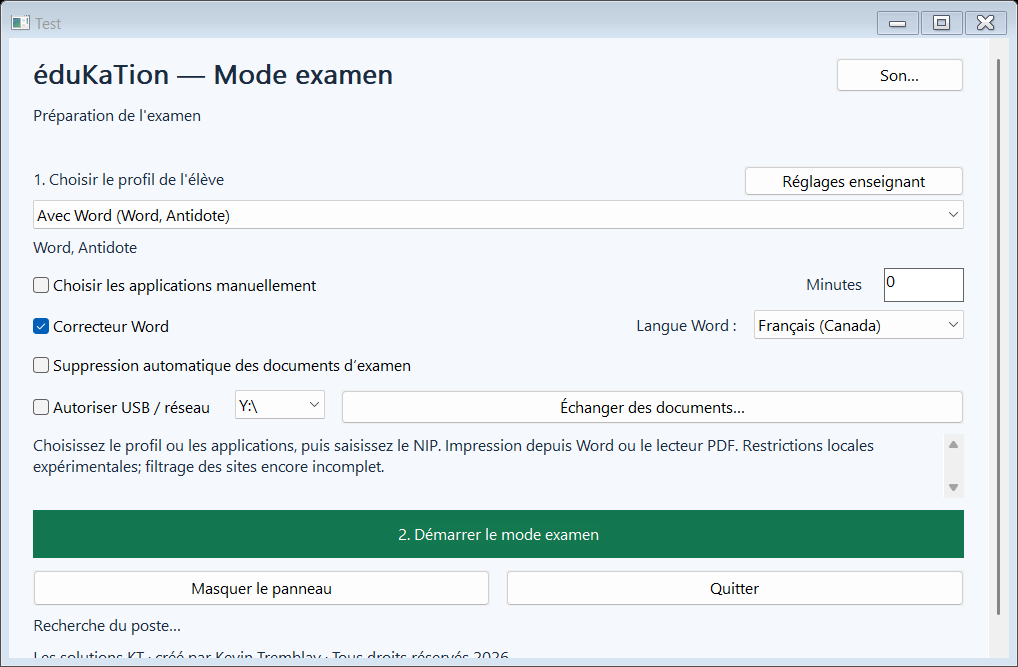
Choose the allowed applications and the assistive tools your students need. In Word, decide whether to allow the spelling checker during the exam.
 Proudly designed in Québec
Reduce opportunities for cheating and protect exam content. Permitted applications, Word configured for exams and the KT PDF reader keep the assistive tools students need, including those used under Québec’s measure 30810.
Mode examen is being validated. Tell us what your school needs to discuss a quote and next steps.
Keep students in the applications permitted for the exam. Manage Word, file access and web browsing while preserving their assistive tools.
Prepare the exam folder, choose the permitted functions and protect the controls with your teacher PIN. Students find their documents and tools within the session.
Let’s discuss your school’s needs and how to prepare for use on your computers.
See exam preparation, the KT PDF reader and the protected session. Keep the assistive tools provided under measures 30810 and 30812.
Choose the allowed applications and the assistive tools your students need. In Word, decide whether to allow the spelling checker during the exam.
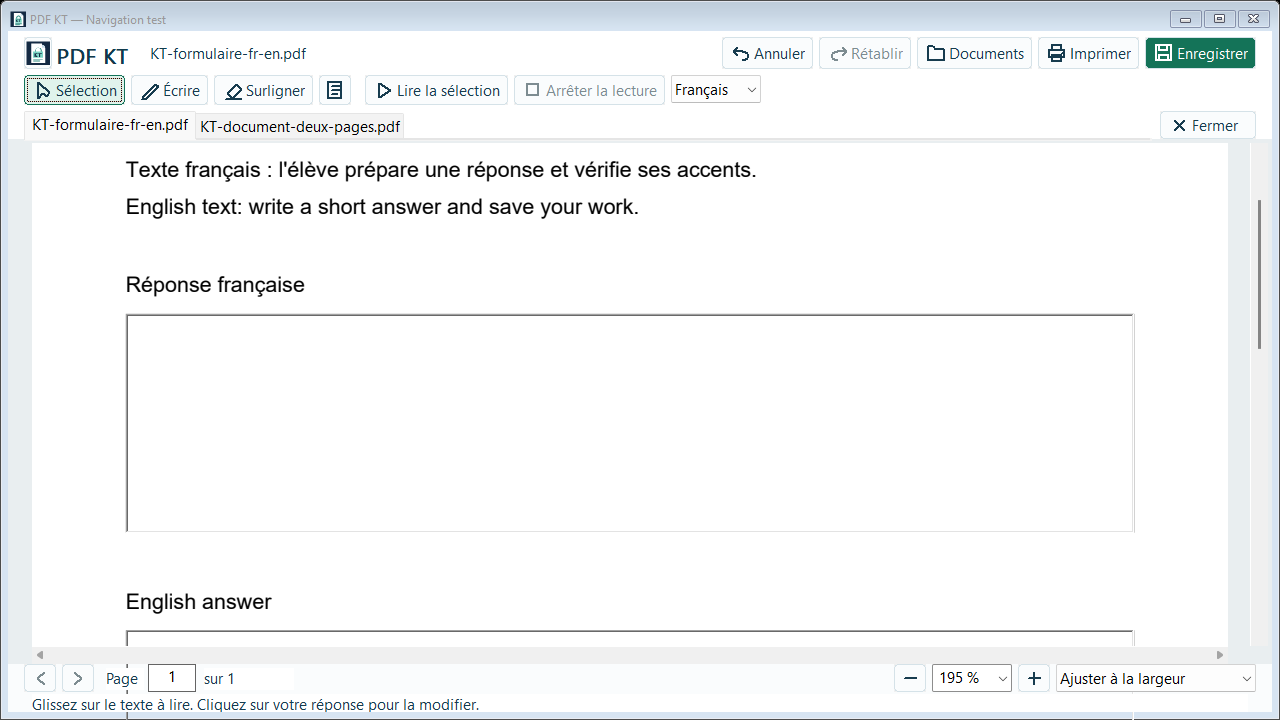
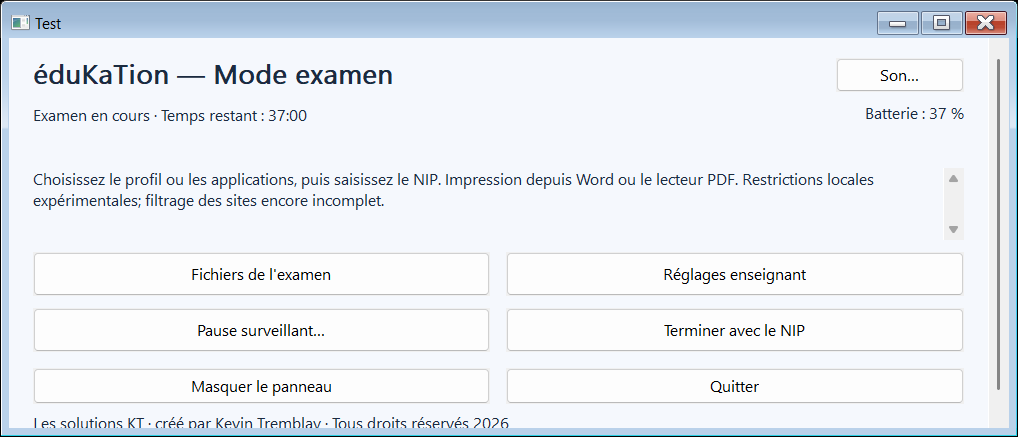
Screenshots from the test version.
Prepare access, tools and documents before the exam. Students get a workspace that supports their learning accommodations.
Word, Lexibar, WordQ, Antidote: choose the applications permitted for the exam and the student’s needs, including tools used under measure 30810.
Students use Usito in the Mode examen browser. Browsing stays within the permitted domains.
Students write in Word within the controlled exam session. Enable or disable spelling and grammar tools according to the exam requirements.
Add documents during preparation. Mode examen creates the assessment folder on the desktop and places the session files inside.
Mode examen saves work in Word and the KT PDF reader during the session. Students can keep writing without extra steps.
Protect the controls for starting, pausing and ending the exam. Keep control of how the session runs.
Students read exam documents, enter answers, annotate and highlight in the built-in reader. You choose the functions permitted for the session.
Allow printing from the KT PDF reader and permitted applications to printers configured by your school.
Choose whether exchanges through USB devices or network drives are allowed. Teachers manage transfers through controls protected by their PIN.
Tell us how many computers you need to equip and which applications your school uses.
We review your situation and answer your questions.
We discuss pricing and terms suited to your needs.
We will keep you informed about software availability and the steps ahead.
Let’s discuss the number of computers and your team’s needs to prepare a quote.
Public or independent schools: tell us about the computers and your team’s needs.
Request a quoteLet’s discuss the needs of multiple schools with your IT team.
Request a quoteRequesting a quote does not commit you to a purchase. Online purchasing and downloading are not yet available; the Windows version is being validated.
Exam documents and answers stay on the computer or in locations chosen by your school. The licensing service does not receive them.
Keep the assistive tools students need, including those used under measures 30810 and 30812. Choose the applications permitted for each exam according to the student’s accommodations.
Our Law 25 preparation starts with minimal data collection. Data protection and retention arrangements are being finalized before commercial launch.
 Proudly designed in Québec
Kevin Tremblay has taught French for nearly 15 years and works as an educational technology specialist. He is developing Mode examen from his experience in schools.
He wants to make organizing exams easier for students and teachers.
Creator of Mode examen · Les Solutions KT
Choose Word and applications used for learning accommodations, such as Lexibar, WordQ or Antidote, from those recognized on the computer. Use a profile or make your own selection.
Yes. Add your PDFs during preparation so students can read them during the exam.
Yes. Students can use the Print button in the integrated PDF reader or the printing commands in the permitted applications, according to session permissions and printer settings.
Contact us to discuss your needs and request a quote. The Windows version is being validated; online purchasing and downloading are not yet available.
No. The licence server receives no exam documents, student names or screenshots. This website’s form collects only professional contact information.
Your school must install these applications and hold their licences. A Mode examen subscription does not include licences for Word, Lexibar, WordQ or Antidote.
Mode examen is designed for Windows computers.
Tell us which computers you need to equip and which applications you use. We will prepare a quote for your school or group of schools.
Email us to discuss your project and request a quote.
Request a quote by email